There’s something almost meditative about the moment a designer drops their work into a MacBook mockup and suddenly — it looks real. Not just good, but believable. The kind of image that makes a client say “yes” before the meeting even starts. In 2025, the way designers are using mockups has evolved dramatically, and if you haven’t kept up, you might be presenting your work in a way that already feels dated. Whether you’re showcasing a SaaS dashboard, a portfolio website, or an app UI, the right MacBook mockup can be the silent salesperson that closes the deal. Let’s dig into what’s trending, why it matters, and where to find the best resources.
From Flat to Dimensional: The Shift in Mockup Aesthetics
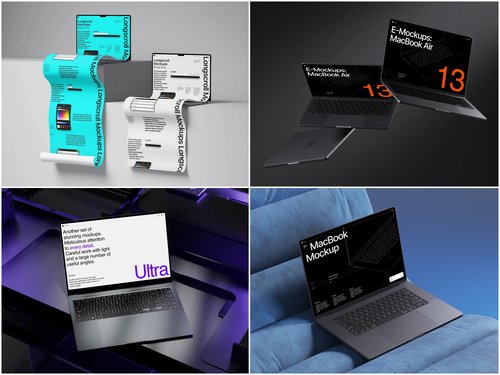
The flat, dead-on screenshot era is over. In 2025, designers are gravitating toward perspective-based presentations — slightly angled, subtly lit, with depth that feels tactile. A well-composed MacBook mockup now leans into environmental storytelling: a laptop on a marble desk with soft morning light, or floating against a deep navy gradient that makes the screen pop like a portal. These aren’t just pretty images. They communicate quality, intention, and professionalism at a glance.
Isometric and three-quarter views have become especially popular, giving viewers a sense of the physical object while still keeping the screen sharp and readable. It’s the sweet spot between realism and clarity.
Color, Context, and Composition — The Holy Trinity of 2025
Modern mockup usage isn’t about slapping a screenshot into a template and calling it done. The most compelling MacBook mockup presentations in 2025 share three defining characteristics:
- Color harmony — The device color (Silver, Space Gray, Midnight, Starlight) is chosen to complement the UI palette, not fight it. A warm-toned interface sings inside a Starlight MacBook against a cream background.
- Contextual staging — The environment hints at the product’s audience. A fintech dashboard feels more credible on a sleek desk setup than floating in void.
- Minimal clutter — White space and breathing room around the laptop keep the eye focused on what matters: the screen content.
Real-World Examples: Where MacBook Mockups Make the Biggest Impact
If you want to understand why designers obsess over the perfect mockup, look at how they’re being used in the wild. A freelance UX designer pitching a healthcare platform landing page will place their design inside a MacBook Pro mockup, surrounded by subtle medical-blue gradients. The result doesn’t just show the design — it sells the vision. Investors and stakeholders can immediately picture the product in action.
E-commerce brands use MacBook mockups to showcase their Shopify stores in lifestyle photography-style images across Instagram and Pinterest. A clean mockup of a fashion boutique’s site, placed on a linen-textured surface with a cup of coffee nearby, drives more engagement than any flat screenshot could.
Digital product creators on platforms like Gumroad and Creative Market use MacBook mockups on their product cover images to dramatically increase conversions. A beautifully rendered laptop showing a Notion template or Figma kit tells buyers exactly what they’re getting — and makes it look irresistible.
Premium MacBook Mockups on ls.graphics — A Designer’s Secret Weapon
When it comes to sourcing top-tier resources, ls.graphics has quietly become one of the most trusted names in the design community. Their MacBook mockup collections are built with a level of craft that genuinely sets them apart from the crowded sea of mediocre templates. Here’s what makes them worth bookmarking:
- Ultra-realistic rendering — Materials, lighting, and shadows that make you do a double-take. Reflections behave the way they do in real photography. The aluminum catches light from the right direction. It doesn’t look like a 3D render; it looks like a photograph.
- Organized, designer-friendly layers — Everything is named, grouped, and structured so that replacing a screen or adjusting a background is a matter of seconds, not minutes. No hunting through unlabeled folders at midnight before a client deadline.
- A wide range of angles — Straight-on, angled, side views, top-down, isometric, and everything in between. Each angle serves a different storytelling purpose, and having them all from one source means your mockup library stays visually consistent across a whole project.
- Multiple color styles — Silver, Space Gray, Midnight, and Starlight are all represented, so you can match the device to your UI palette rather than forcing a compromise.
- Stylish minimalistic compositions — The provided scenes feel editorial rather than generic. These aren’t just containers for your work — they’re designed objects in themselves.
- Very easy to use — Drop your UI in, and the whole image looks intentional and polished from the first second. No advanced Photoshop wizardry required; the files are built for speed and simplicity.
Emerging Micro-Trends to Watch Right Now
Beyond the broad aesthetic shifts, several specific micro-trends are shaping how designers use MacBook mockups in 2025:
- Dual-device narratives — Pairing a MacBook with an iPhone or iPad mockup to show responsive design across breakpoints in a single hero image.
- Dark mode showcases — With dark UI design reaching peak popularity, Space Gray and Midnight MacBook mockups on dark backgrounds create a dramatic, high-contrast visual language.
- Motion-ready stills — Static mockups clearly designed to be animated, with clean layering that invites screen-replacement animations in After Effects or Figma’s prototyping tools.
Conclusion
The way you present your design work matters as much as the work itself. In 2025, a thoughtfully chosen MacBook mockup doesn’t just frame your UI — it amplifies it, contextualizes it, and makes it emotionally resonant for whoever’s looking. The trends are clear: realism over flatness, context over void, and craft over convenience.
For designers who take presentation seriously, ls.graphics remains one of the best places to find mockup resources that actually live up to these standards. The premium quality, thoughtful composition, and ease of use mean less time wrestling with files and more time letting your work speak for itself. Because at the end of the day, your design deserves a stage that’s just as good as what you’ve built.